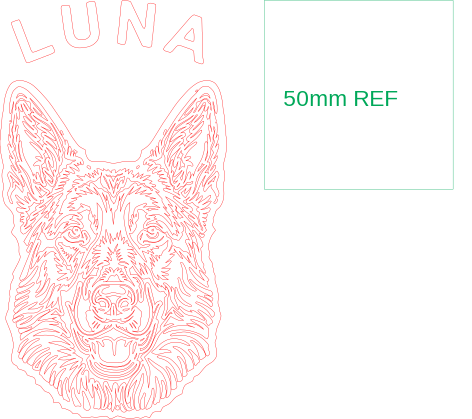
Pixel2Path Studio by Ivolga Co. replaces fragmented 2D and 3D utilities (such as manual Inkscape bitmap tracing, node deletion, and Tinkercad boolean extrusion) with a unified, hardware-aware manufacturing pipeline. Upload any PNG, JPG, WEBP, SVG, TIFF, BMP, GIF, JFIF, or Apple HEIC/HEIF graphic (≥ 800 × 800 px recommended; 450 × 350 px minimum floor, or ≥ 600 × 140 px for wide wordmark banners—with automatic smartphone EXIF upright orientation, CMYK ICC profile conversion, sharpest-frame multi-frame GIF/WebP selection, native .SVG vector rasterization, and QR Code & 1D Barcode 90° module locks)—or type custom straight or concentrically arched typography—to export watertight 3D .STL meshes (Raised Relief Stamps, Recessed Wax-Seal Cavities, Sculpted 3D Bas-Relief Plaques, Polymer Clay Micro-Cutters, and M5/M8 Threaded Brass Dies), AutoCAD R2010 .DXF polylines, and tangent-continuous Cubic Bezier Compound Path .SVG cut files calibrated to exact real-world millimeters (mm).
<text> outline checks, True Minted Coin recessed-table retention vs. blank stone medallion ring stripping, and 1-click 🪄 Descreen Dots / Smooth Specks (0 Credits) + 🗿 Convert Hatching to 3D Relief (0 Credits). Complex photos, 3D busts, and pets engage the Autonomous Multi-Stage Advanced Vision Pipeline—with 0-credit session caching between ✨ Apply, ✨ Adapt for Machine, and 🔄 Clear Enhancement.
80 characters; press Enter ↵ or tap ✅ Apply Text), 7 bundled workshop fonts (Clean Bold Block, Classic Serif, Heavy Impact Block, Military Stencil, Vintage Typewriter, Varsity Block, Cursive Script), Letter Boldness (1–10), Text Size (50–150% of Logo), concentric Text Arced Around Logo layouts, and a pre-export 🪞 Mirror Stamp Text Guard across face-down 3D stamps, polymer clay cutters, wax seals, brass dies, and laser rubber stamps (automatically skipped on upright bas-relief plaques, decals, and stencils) so pressed lettering never prints backwards.
| Machine Preset | Export Formats | Default Specs | Step 2B Tool Functions & Built-In Geometry Guards |
|---|---|---|---|
| 🧊 3D Printer (Slicer Amber/Green) |
.STL (Default) |
50 mm Width 3.0 mm Base 2.5 mm Relief |
6 Step 2B Tool Functions: 🔼 Raised Relief Stamp, 🔽 Recessed Cavity Seal (≥1.5 mm floor guard), 🗿 Sculpted 3D Bas-Relief (custom-shaped variable-Z plaques), 🔪 Polymer Clay Micro-Cutter (stepped 3.2 mm grip flange + 1.2 mm wall + 0.42 mm razor cutting lip, 10.5 mm Z), 🧁 2-Part Cutter + Stamp Pair (0.70 mm clearance side-by-side set), and 🕹️ Handled Stamp / Pottery Chop (20–26 mm grip). Enforces ≥0.45 mm wall & ≥0.52 mm groove conditioning plus footprint-aware 2D Build Plate Auto-Fit. |
| ⚡ Laser Engraver (Vector Hairline Red) |
.SVG (Default) • .DXF |
60 mm Width 2D Closed Loops |
5 Step 2B Tool Functions: ⚡ Standard 1:1 Cut / Engraving, 🪞 Mirrored Rubber Stamp + Contour Cutline (OUTER_BORDER_CUT), 🧵 Stitch-Hole Leather Hat Patch (engrave + 1.1 mm stitch holes at 3.8 mm pitch on STITCH_HOLES + border cut), 🔑 Keychain / Tag Cutline (auto-welded Ø 4.5 mm ring tab), and 🎨 Framed Spray Stencil (≥7.5 mm overspray border + 1.6 mm holding bridges). Calibrated for 0.10 mm laser kerf with 0.0882mm (0.25pt) Bezier hairlines. |
| ✂️ Vinyl Plotter (Contour Cut Magenta) |
.SVG (Default) • .DXF |
80 mm Width Drag-Knife Safe |
4 Step 2B Tool Functions: ✂️ Standard Weed-Safe Vinyl / HTV Cut, 🏷️ Die-Cut Sticker Halo (2.5 mm smooth contour cutline), 📦 Easy-Weed Box Frame (3.0 mm perimeter weeding border), and 🎂 Mylar Cake / Airbrush Stencil (frame + 1.6 mm holding bridges). Enforces a ≥0.75 mm drag-knife wall guard, 0.35 mm² dust filter, and swivel-blade micro-jag checks. |
| 🗜️ Clicker Die (Die-Board Cut Paths) |
.DXF (Default) • .SVG |
100 mm Width Die-Board Cut Paths |
3 Step 2B Tool Functions: 🗜️ Standard Steel-Rule Die Cut (STEEL_RULE_CUT), 🧵 Leather Patch Die + Stitch Punches (1.2 mm tube punch holes on STITCH_HOLES), and 🔑 Fold-Over Key Fob Die (mirrored fold symmetry + centered strap slot). Enforces 2pt (0.71 mm) blade bendability checks; locks artwork dilation to 0.0 mm whenever a Step 2B Die Shape is active to prevent duplicate cut loops. |
| 🔩 CNC / Brass Die (CAD/CAM Toolpath Blue) |
.DXF (Default) • .STL • .SVG |
50 mm Width 8.0 mm Base 3.0 mm Relief |
5 Step 2B Tool Functions: 🔼 Raised Brass Die, 🔽 Brass Wax-Seal / Foil Cavity, 🗿 3D Machined Coin / Medallion, 🔩 M5 / M8 Threaded Brass Die (blind rear pilot bore: M5 × 0.8 = Ø 4.20 mm or M8 × 1.25 = Ø 6.80 mm, ≤6.0 mm deep with a ≥1.5 mm concave side-wall containment guard for branding irons & arbor presses), and 📐 Draft-Tapered V-Bit Relief Die (12° stepped wall draft). Enforces ≥0.38 mm wall & ≥0.44 mm groove guards on 3D .STL stock. |
Every Step 2 machine includes a live-previewed outer form selector (rendered in amber with green stitch-hole overlays in the Sticky Live Preview Dock, and extruded directly as custom 3D baseplates or 2D cut borders): ⬜ Standard Rectangle, 🔲 Rounded Rectangle, ⚪ Circle / Medallion, 🥚 Oval / Ellipse, 🌊 Contour Offset (Hugs Artwork), 🛡️ Shield / Crest, ⬡ Hexagon, 🛑 Octagon, 📮 Postage Stamp (Perforated Edge), ☁️ Wavy / Scalloped, 🎟️ Ticket Stub (Corner Notches), 🏺 Apothecary Plaque, 🪨 Organic Signet Pebble, 🚩 Banner / Swallowtail Pennant, 🌙 Curved Arc (Pottery Foot-Ring), 🎋 Hanko Chop (Slim Vertical Capsule), and 🧩 Flush Tile (0mm Tessellation Border) (plus 🚫 None for unframed 2D paths—automatically upgraded to 🔲 Rounded Rectangle in both Live Preview and CAD exports when paired with frame-dependent keychain, fob, stitch-patch, halo, easy-weed, stencil, or rubber-stamp tools; Clicker Die omits tight perforations/scallops that cannot bend on a 2pt steel-rule blade).
0.0 mm while stripping blank unlettered stone medallion rims, and extracts sculpted 3D facial contours.45° Anti-Blotch separator..SVG vectors (supporting mm/cm/in/pt/% units, rx/ry rounded rects, skewX/Y, and nonzero + evenodd winding), and QR/1D barcodes on upload. On Laser & 2D CNC, fine parallel etching troughs trace 1:1; on 3D Printer, Vinyl Plotter, and Clicker Die, you can either apply Advanced Vision or tap 🗿 Convert Hatching to 3D Relief / Smooth Cut (0 Credits — Instant) to descreen cross-hatching into a solid raised plateau.Open the 📜 AI Prompt Generator (ChatGPT, Gemini, Claude, Grok, etc.) — Tailored to Your Machine expander in Step 1, choose from 4 Target Machine Style presets (🛡️ Strict-Fidelity 3D Stamp & CNC Cleanup with positive polarity & pose lock, 🏛️ Classic 3D Banknote & Intaglio Engraving, ✂️ Vinyl Plotter & Drag-Knife Stencil, or 🗜️ Clicker Die Cut Template), enter your subject in Add details about your image:, tap Enter, and click 📋 Copy Prompt to Clipboard—or copy this master Banknote template:
≥ 800 × 800 px recommended; 450 × 350 px minimum floor, or ≥ 600 × 140 px for wide banners; if uploading an .SVG with live <text> fonts, convert text to outlines first via Illustrator Ctrl+Shift+O or Inkscape Object to Path).🧊 3D Printer, ⚡ Laser Engraver, ✂️ Vinyl Plotter, 🗜️ Clicker Die, or 🔩 CNC / Brass Die), pick your Step 2B Tool Function and Stamp / Cut Silhouette (plus M5 or M8 rear pilot bore if using Threaded Brass Die), and choose ⚡ Smart Auto-Trace or 🏛️ Classical Banknote Hatching. On mobile phones, use the Sticky Live Preview Dock pills (Auto, Compact, Half, Full, Unpin ↕) to adjust preview height while scrolling.5–350 mm)—height scales automatically (and default-width Logo & Logo + Text Combo designs auto-step width across all 5 machines if fine details need wider toolhead clearance). On .STL exports, choose 🔼 Raised Relief Stamp, 🔽 Recessed Cavity Seal, or 🗿 Sculpted 3D Bas-Relief. 🔄 Mirror Horizontally auto-enables on face-down Step 2B presets (Clay Cutters, 2-Part Sets, Wax Seals, Rubber Stamps & Threaded Dies) and can be toggled anytime for stamps or HTV iron-on. On Laser/Vinyl, optionally check 🌉 Add Stencil Holding Bridges (1.6 mm) or 📏 Include 50×50 mm Scale Calibration Box (.SVG / .DXF).0–15 mm), 3D Relief Height (0.5–15 mm), 3D Sculpt Detail / Cameo Balance (0.5–1.6), Detail / Edge Balance (-80 to +80), Extra Line Thickness Boost (0–8), Outer Blade Offset (0–6 mm when Clicker Die shape is 🚫 None), or Banknote Hatch Density (40–160), Highlight Fill (1–10), and Wave Curvature (0–10).0 open paths, closed 'Z' compound / LWPOLYLINE loops, ≤ 4,800 subpath / ≤ 12,000 node controller safety, watertight 3F = 2E 2-manifold .STL edges, physical toolhead wall & un-shrunk M5/M8 1.5 mm tap-bore guards, and footprint-aware 2D (Width × Height) Build Plate Overhang checks for 256×256 mm & 220×220 mm beds (accounting for Step 2B shapes and dual 2-Part Cutter span, with 45° diagonal fit detection & 1-click 📐 Auto-Fit Straight to Bed). Click 🧪 Test Your Design: Generate 75% Cutaway Proof to inspect 1:1 slicer/CAD wall physics free across any of the 23 modes, or unlock a pass in Step 3 (or enter an existing Access Key) to click ⚡ Generate Full Production File (100% uncut)..STL is pre-verified by the Step 3 Manufacturing Validation Report as a watertight 3F = 2E 2-manifold solid with 0 open boundary edges—no slicer mesh repair needed).0.16–0.20 mm layers (0.16 mm for 0.42 mm clay cutter lips), 4–5 top shells, and 80%–100% solid infill for arbor/clicker leather presses.Ø 4.20 mm (tap with standard M5 × 0.8 bottoming tap) or Ø 6.80 mm (tap with M8 × 1.25 bottoming tap) with a ≥1.5 mm side-wall clearance guard.0.12–0.16 mm layer height with 4–5 top shells; switch slicer preview Color Scheme ➔ Height and tilt 35° to inspect full Z-relief depth.
0 open paths, duplicate STEEL_RULE_CUT lock, and ≤4,800 subpath / ≤12,000 node controller safety)..SVG (Default for Laser & Vinyl Plotter): Exports closed 'Z' tangent-continuous Cubic Bezier curves with exact 0.0882mm (0.25pt) hairlines: #FF0000 (unified fill-rule="evenodd" artwork compound path), #000000 (outer border / keychain tab), #0055FF (stitch holes), and optional #00A859 "50mm REF" calibration square..DXF (Default for Clicker Die & CNC): Exports closed AutoCAD R2010 LWPOLYLINE loops (group 70 & 1 == 1, lineweight=9, 0.09 mm / 0.25 pt hairline) on dedicated layers: LASER_OR_CUT_PATHS, OUTER_BORDER_CUT, STITCH_HOLES, STEEL_RULE_CUT, RAISED_RELIEF, BASEPLATE_CUT, and SCALE_REF_50MM (ideal for AutoCAD, Fusion 360, Vectric VCarve, and free Silhouette Studio Basic Edition). To group inner holes manually: Illustrator Ctrl+8 • Silhouette Ctrl+E • LightBurn Alt+J.50.0 × 50.0 mm Calibration Square: When enabled, verify that the #00A859 "50mm REF" square in .SVG (or SCALE_REF_50MM layer in .DXF) measures exactly 50.00 × 50.00 mm on import, then hide or delete it before cutting.
±0.05 mm of your target width. Internal sub-spec strokes and recessed grooves are automatically conditioned (≥0.45 mm walls & ≥0.52 mm grooves on 3D Printer .STLs, ≥0.75 mm on Vinyl Plotter, ≥0.38 mm walls & ≥0.44 mm grooves on CNC 3D .STLs, plus un-shrunk M5/M8 1.5 mm tap-bore wall clearance) to prevent physical toolhead failure. Inspect our ungated 1:1 mm LUNA benchmark files (.STL, .SVG, .DXF) and reproducible Independent CAD Topology Audit Report (CAD_AUDIT_REPORT.md) directly..STL, .DXF, or .SVG; re-downloading an already-generated proof uses 0 extra quota). All 23 Step 2B tool functions—including Polymer Clay Micro-Cutters, 2-Part Cutter + Stamp pairs, Recessed Cavity Seals, and M5/M8 Threaded Brass Dies—are unlocked for proof testing: each free proof exports a watertight 75% cross-section (1 quadrant open, named proof_75pct_cutaway_25mm_*) so you can inspect 0.42 mm Arachne blades, 0.70 mm stamp clearance, cavity floors, M5/M8 rear tap bores, and closed 2D kerf paths at exact 25.00 mm span before unlocking a pass for your 100% uncut production tool. If a detailed design verified at 60–100 mm would fuse >35% of its inner holes when shrunk into a 25 mm miniature, the Shrink-Physics Gate alerts you before export so you never print a fused test piece.350 mm) + 3 Ready-to-Cut CAD Vault .ZIP packs + 25 Advanced Vision Credits + 20 AI Workshop Troubleshooter turns (tracked separately—uses 0 Studio Vision credits). The 24-hour clock starts at checkout and displays live remaining time in the Studio header.0 Studio Vision credits). Cancel anytime in 1 click via 💳 Manage or Cancel Studio Monthly Subscription → inside your unlocked TPS-XXXX-XXXX Studio session, via your Stripe receipt email, or via contact@ivolgaco.com.TPS-XXXX-XXXX) & Single-Device Lock: Enter your key on your phone, Windows PC, or Mac to transfer your unlocked session and remaining credits instantly (automatically preserved across Stripe redirects via your session anchor). Passes enforce Single-Device Active Session Lock (1 active studio device at a time, while verifying on CAD Vault or AI Troubleshooter never logs out your studio session)..STL, .DXF, and .SVG downloads use 0 credits. An Advanced Vision credit is charged at most once per uploaded image—toggling between ✨ Apply, ✨ Adapt Advanced Vision for Machine (0 Credits), and 🔄 Clear Enhancement (0 Credits) costs 0 extra credits.
Alongside custom logo/photo conversion in Pixel2Path Studio, the Ready-to-Cut CAD Vault provides shop-ready 1:1 millimeter fabrication templates for leathercraft clicker dies & stitched goods, guitar/luthier routing templates, 3U/1U Eurorack & pedal enclosures, EDC gear, gaskets, and CNC workshop jigs—unlocked with the same TPS-XXXX-XXXX Studio Access Key, paired with our interactive AI Workshop Troubleshooter for instant slicer, laser kerf, and CAM setup diagnostics.
*_production_package.zip containing:.DXF (1:1 mm): Closed perimeter cut paths on CUT_OUTLINE, internal stitch holes / fold lines / hardware centers on SCORE_HOLES, and a 50 × 50 mm verification square on SCALE_REF_50MM..SVG (1:1 mm): Ready for LightBurn, Glowforge, xTool, Cricut, and Illustrator.README_Assembly_Guide.md & LICENSE.txt: Recommended material thickness, hardware bill of materials, assembly notes, and royalty-free commercial physical-goods cut license.
✨ NEW for recent releases), filterable by workshop category or instant keyword search, loading 12 blueprints per page (➕ Load 12 More) with full-screen 🔍 Inspect zoom.TPS-XXXX-XXXX key into the Vault unlock bar—verifying or downloading on vault.html never signs out your active session on app.ivolgaco.com..ZIP packs (re-downloading unlocked packs uses 0 picks); $25/mo Studio Monthly unlocks unlimited .ZIP downloads.
08:00 & 20:00 UTC). The live catalog refreshes every 6 hours, or instantly anytime you click 🔄 Refresh..DXF or .SVG at 1 Unit = 1 Millimeter (mm), confirm the SCALE_REF_50MM reference square measures exactly 50.0 × 50.0 mm before deleting or hiding that layer and running your job.TPS-XXXX-XXXX key (never signs out app.ivolgaco.com), select your workshop machine (3D Printer, Laser Cutter, Vinyl Plotter, Clicker Die, or CNC / Brass Die), and attach or paste (Ctrl+V) 1–3 clear photos of a failed print, cut edge, toolhead, or slicer settings screenshot (compressed locally in browser RAM to ≤1600px). Supports multi-turn follow-ups (20 turns on the $8 24-Hr Pass; 100 turns / 30 days on $25/mo Studio Monthly) without consuming Studio Advanced Vision credits..STL, .DXF, and .SVG toolpaths are processed exclusively in volatile server memory (RAM) during your active browser session, bounded by automatic two-tier session-cache eviction, and purged automatically when your session closes or rotates. Client artwork is never written to permanent object storage, published, sold, or used to train external or public models.25 MB maximum for binary rasters (PNG, JPG, WEBP, TIFF, BMP, GIF, HEIC—verified by magic bytes prior to XML checks) and 2 MB maximum for .SVG vector XML, paired with an actionable 64 MP camera resize guard, automated XML entity/script/recursion sanitization (depth ≤ 64) prior to parsing, font binary header validation, and session-scoped passcode brute-force rate limiting (5-minute lockout after 8 failed guesses, with transient network outage protection).TPS-XXXX-XXXX passcodes, expiration/reset timestamps, single-device session identifiers, credit balances, Vault claim slugs, and anonymous Troubleshooter turn counters (chat_turns_used / chat_reset_at — zero user artwork or photos stored);
(3) Enterprise Cloud Vision Infrastructure — Encrypted TLS optical/vision processing invoked only when Studio Advanced Vision / Banknote intaglio transformation or AI Workshop Troubleshooter photo diagnosis (resized locally in browser RAM to ≤1600px) is requested (processed strictly in-memory without permanent storage and excluded from public AI model training);
(4) Cloud Content Delivery — Read-only delivery of pre-verified Ready-to-Cut CAD Vault .ZIP bundles on vault.html.
(A formal list of sub-processors is available upon verifiable request at contact@ivolgaco.com.)
0.4 mm FDM nozzles, ≥0.75 mm strokes for vinyl weeding, and ≥0.38 mm walls for CNC 3D meshes, plus un-shrunk M5/M8 1.5 mm tap-bore wall clearance). Always verify material settings, press tonnage, and laser kerf using a free 25 mm 75% Cutaway Proof before production runs.150 and Troubleshooter turns to 100 without rollover) and may be cancelled anytime prior to the next billing cycle via 💳 Manage or Cancel Studio Monthly Subscription → (open inside your unlocked TPS-XXXX-XXXX Pixel2Path Studio session), via your Stripe receipt email management link, or by emailing contact@ivolgaco.com..ZIP/.DXF/.SVG packs as standalone digital files is prohibited. Always test material settings, press tonnage, and laser kerf with a free 25mm 75% Cutaway Proof before production runs.