Laser Leather Hat Patch .SVG & Stitch-Hole .DXF Generator
Turn client logos, photos, or concentrically arched typography into true 1:1 millimeter (±0.05 mm) LightBurn-ready Cubic Bezier .SVG compound paths and AutoCAD R2010 .DXF layers — complete with 1.1 mm perimeter stitch holes, 17 boutique patch silhouettes, steel-rule clicker die rules, and a #00A859 50×50 mm scale check.
.SVG + R2010 .DXF on every pass
Step 2B Leather, Rubber Stamp & Die-Board CAD Modes
Calibrated for 0.10 mm CO2/diode laser kerf and 2 pt (0.71 mm) steel-rule die blades with post-filter ±0.05 mm outer dimensional lock.
🧵 Stitch-Hole Leather Hat Patch
Combines your interior #FF0000 fill-rule="evenodd" Cubic Bezier engraving compound path with #0055FF 1.1 mm stitch holes at 3.8 mm pitch (STITCH_HOLES) and a clean #000000 perimeter cutline (OUTER_BORDER_CUT) across 17 silhouettes.
🗜️ Steel-Rule Clicker Die (.DXF)
Need press-ready leather dies? Switch to Clicker Die mode for AutoCAD R2010 closed LWPOLYLINE paths on STEEL_RULE_CUT, 1.2 mm tube stitch punches, and automatic Mirrored Fold-Over Key Fobs.
🪞 Rubber Stamps & Keychain Tabs
Also generates pre-mirrored laser rubber stamp plates with contour cutlines, auto-welded Ø 4.5 mm keychain ring tabs, 1.6 mm bridged spray stencils, and 19th-century 45° Banknote cross-hatch / intaglio linework.
LightBurn, Illustrator & AutoCAD 1:1 mm Import Specs
Every vector export uses explicit millimeter units plus an optional 50.0 × 50.0 mm calibration square so 72/96 DPI import scaling never shrinks or bloats your patch.
| CAD / Laser Layer | .SVG Attribute (0.0882 mm / 0.25 pt) |
R2010 .DXF Layer ($INSUNITS = 4 mm) |
Recommended LightBurn Operation |
|---|---|---|---|
| Interior Logo / Text Engraving | stroke="#FF0000" • fill-rule="evenodd" Cubic Bezier compound <path> |
LASER_OR_CUT_PATHS (closed LWPOLYLINE, 0.09 mm) |
Fill (Engrave first; inner letter counters stay automatically hollow) |
| Perimeter Stitch Holes | stroke="#0055FF" (Ø 1.1 mm laser / Ø 1.2 mm clicker) |
STITCH_HOLES |
Line (Cut) — run before outer border cut so leather stays flat |
| Outer Patch / Keychain Cutline | stroke="#000000" (17 Step 2B silhouettes) |
OUTER_BORDER_CUT / STEEL_RULE_CUT |
Line (Cut) — final pass with air assist enabled |
| 50 × 50 mm Scale Verification | stroke="#00A859" <rect width="50" height="50"> ("50mm REF") |
SCALE_REF_50MM (50.00 × 50.00 mm closed square) |
Confirm size reads 50.00 × 50.00 mm on import, then set Output = Off |
Ungated Raw 1:1 mm LUNA Vector & CAD Benchmarks
Download and inspect our raw LUNA benchmark exports directly in LightBurn, Adobe Illustrator, AutoCAD, Fusion 360, or Silhouette Studio — 0 login and 0 passcode required.
.SVG (242,650 B · 50mm REF)
📐 Download LUNA R2010 .DXF (158,499 B · SCALE_REF_50MM)
🧊 Download LUNA 3D Stamp .STL (2.27 MB)
🔬 GitHub Benchmark Repo →
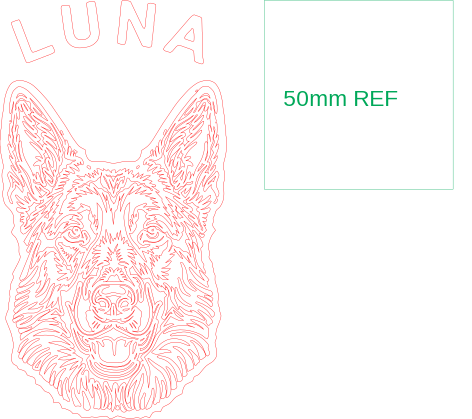
Verified luna-laser-patch.svg & luna-cad-vectors.dxf telemetry: exact 60.00 × 110.76 mm graphic BBox (60.0 × 110.7 mm target ±0.05 mm), 105 islands / 58 inner holes (173 closed loops), #FF0000 0.0882 mm Cubic Bezier compound path, plus exact 50.00 × 50.00 mm calibration square on #00A859 / SCALE_REF_50MM.
Frequently Asked Laser Patch & DXF Questions
Does Pixel2Path Studio sell physical leather patches or digital .SVG and .DXF files?
.SVG, .DXF, and .STL files for you to engrave and cut on your own CO2/diode laser (xTool, Glowforge, OMTech, Thunder, Epilog), clicker press, or CNC machine. No physical patches, stamps, or dies are sold or shipped.
How are color layers and DXF layer names structured for LightBurn and die-board CAM?
.SVG exports (1:1 mm viewBox, 0.0882 mm / 0.25 pt hairline), #FF0000 contains the unified fill-rule="evenodd" Cubic Bezier engraving compound path (inner letter counters pre-grouped so holes never engrave solid), #0055FF contains the 1.1 mm perimeter stitch holes, #000000 contains the outer patch or keychain cutline, and #00A859 contains the optional 50.0 × 50.0 mm "50mm REF" calibration square. In AutoCAD R2010 .DXF exports ($INSUNITS = 4 mm, 0.09 mm hairline), closed LWPOLYLINE loops are separated onto LASER_OR_CUT_PATHS, STITCH_HOLES, OUTER_BORDER_CUT, STEEL_RULE_CUT, and SCALE_REF_50MM.
How do I verify true 1:1 millimeter import scale in LightBurn or Adobe Illustrator?
.SVG or .DXF into LightBurn, Illustrator, CorelDRAW, or AutoCAD at 1 Unit = 1 Millimeter, select the green #00A859 (SCALE_REF_50MM) square and confirm its dimensions read exact 50.00 × 50.00 mm—eliminating 72/96 DPI scaling errors before firing your laser—then hide or delete that reference box.
What is the difference between Laser Stitch-Hole Patches and Clicker Die Stitch Punches?
1.1 mm diameter stitch holes spaced at 3.8 mm pitch calibrated for 0.10 mm laser kerf alongside your interior engraving vectors. Clicker Die Leather Patch mode generates 1.2 mm tube-punch circles on STITCH_HOLES paired with bend-safe 2 pt (0.71 mm) blade geometry on STEEL_RULE_CUT (and locks artwork dilation to 0.0 mm when a Step 2B frame is active so die boards never receive duplicate cut lines).